Window layout
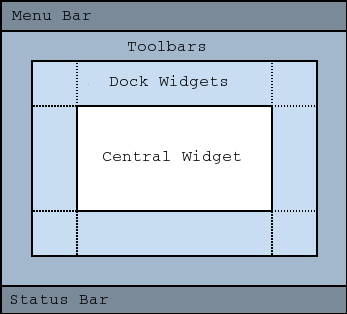
The Plover2CAT editor window uses Qt MainWindow layout. At the top of the window is a menu bar, and then the toolbars. At the bottom of the window is a status bar. Docks can be “docked” into the main window on the left and right sides of the window, and also below the toolbar and above the status bar. The central area in the window is the actual “editor” or writing area.
Status bar
The status bar will show messages regarding file changes and error messages.
Toolbars
The toolbars provide shortcuts to menu items. There are four toolbars which can be detached from the toolbar area to float or change positions by clicking on the grip at the beginning of the toolbar.
File toolbar
Edit toolbar
Steno toolbar
Audio toolbar
Editor
The central widget of the window is the writing area or the “editor”. Under the surface, this is a QTextEdit that displays richtext for a semi WYSIWYG that tries to mimic the appearance of the transcript as it would be if exported.
Docks
There are six docks, each of which can be detached to float or removed/shown in the window through the menu.
Paper Tape
Suggestions
Reveal Steno
History
Audio Controls
Toolbox
See the docks page for descriptions of these docks.