Create New Transcript
Plover2CAT should be installed installed (see previous tutorial) for this tutorial.
In this tutorial, you will learn how to create a new transcript in Plover2CAT.
Open Plover2CAT
Open Plover and then open Plover2CAT from the Tools menu.

The editor window will open.
Create transcript folder
Click on File > New in the menu.
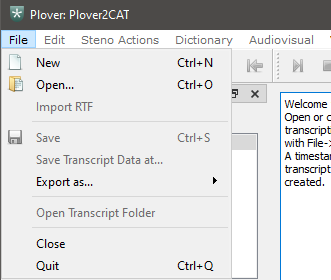
An empty transcript will appear in the center editor, with a tab name of transcript-TIMESTAMP. It is now possible to write into this editor.
Save transcript
To save the transcript, use File > Save or Ctrl + S to save.
The default name for the transcript uses the format transcript-TIMESTAMP. It is possible to change the default name to any that the file system will accept (those without forbidden characters such as " in Windows).
A folder with this name will be created containing necessary subfolders and text files.